Every class.
One board.

Canvas, the homework teachers type into Google Docs, your grades and your games — all in one place. On your Mac, or in Chrome.

Free right now The board is always free. The AI is free for everyone until November 1.

Federalist 10 & 51 — readingCanvas
Lab report — limiting reagentGoogle Doc
Unit 1 FRQ practiceAP Classroom
Examen — pretéritoVeracross
Stoichiometry set 3Albert.io

Five places your homework hides. One place it shows up.

What it does.

Your homework hides in five places. SillyBus finds it and puts it on one board, sorted by what's due first.

One board

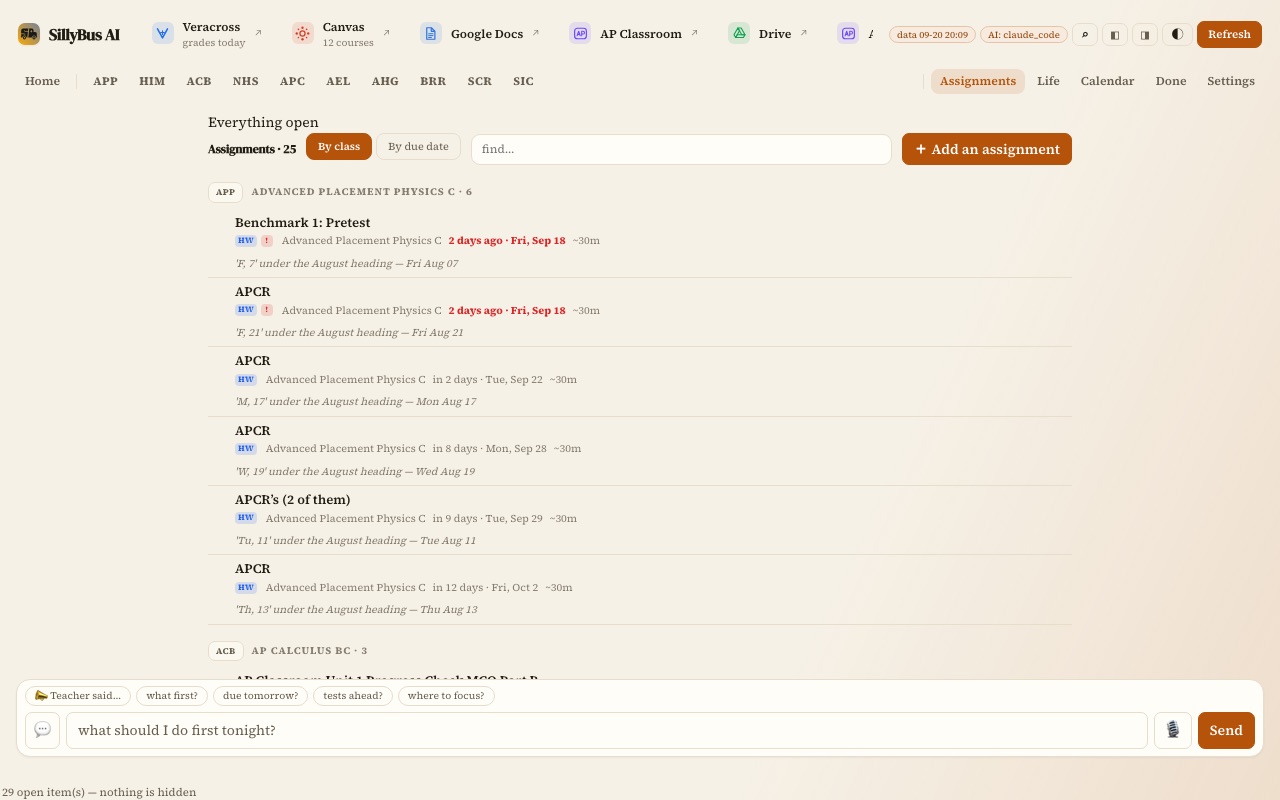
Your Canvas assignments, plus the homework teachers type into the Google Docs on their class pages. Due tonight comes first.

Your grades

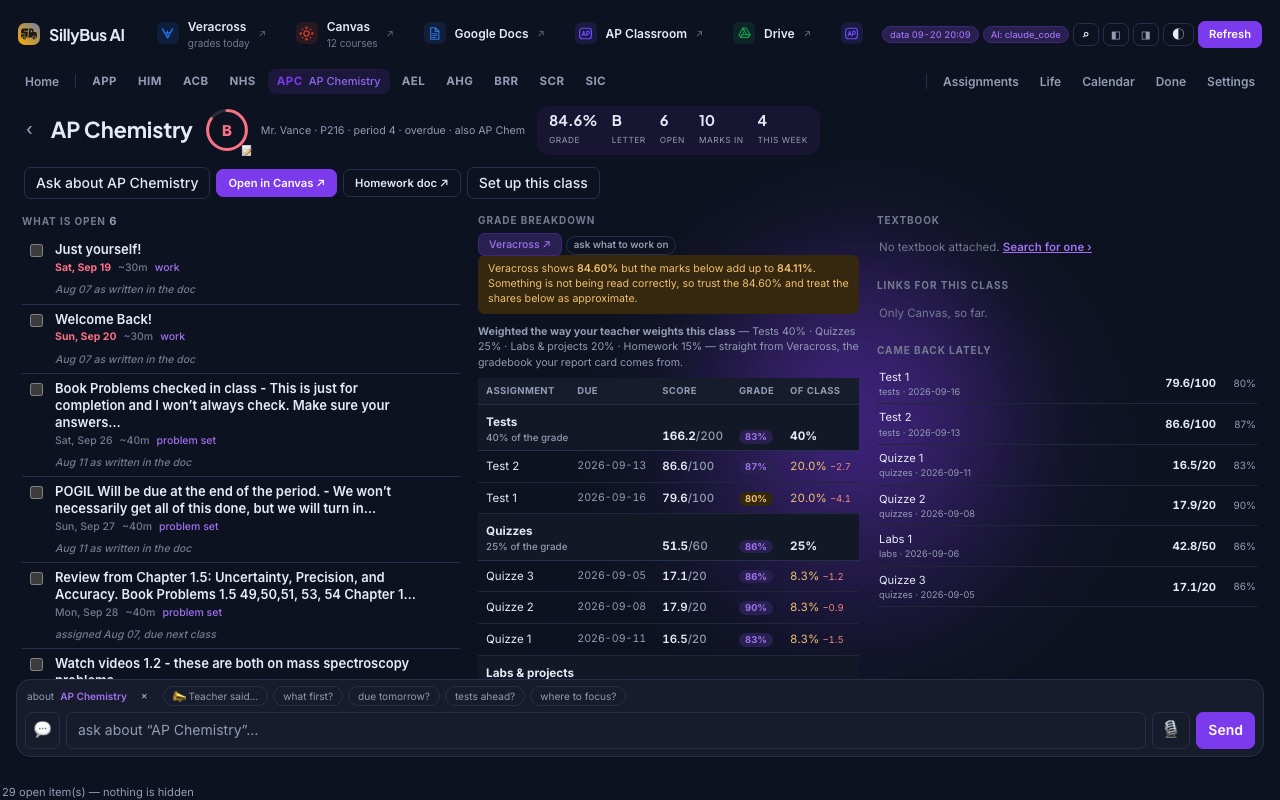
Real grades from Veracross, class by class, with each category broken down.

A calendar

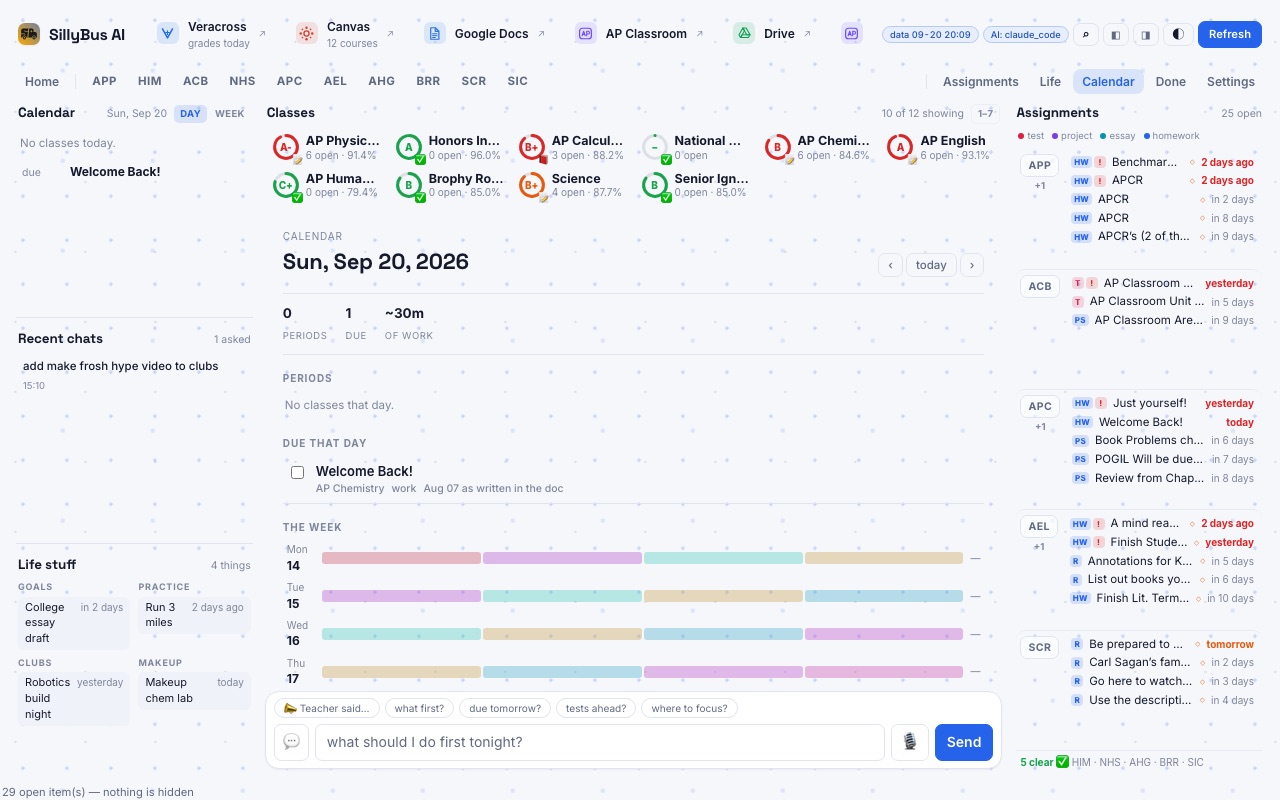
Your classes, your homework, and your TeamSnap games and practices, all on one calendar. Google Calendar can join in too.

Just ask

Type “what's due tomorrow?” and get a straight answer. It explains things like a tutor, but it won't do the work for you.

SillyBus Lock

Like Screen Time, but for homework. Games and social apps wait until today's work is ticked done.

On your Mac

A Chrome extension

The same board inside Chrome. Its button can link a page to SillyBus, like your TeamSnap schedule or a teacher's doc.

Chrome Web Store

Get SillyBus AI.

Pick one. Both are free.

Mac app

Download for Mac

Installs like any other app. No Terminal needed.

  1. Download the file.
  2. Open it and drag Silly Bus AI to Applications.
  3. The first time, your Mac asks. Click Open Anyway in System Settings → Privacy & Security. Only once.
  4. SillyBus sets itself up in a couple of minutes and opens.
Chrome extension

Add to Chrome

The same board, right inside the Chrome you already use. One click from the Chrome Web Store.

Questions? Email info@sillybusai.com

Sorted for you.

Due tonight first. Always.

Stays on your computer.

Your schoolwork never leaves.

AI only when you ask.

Off by default. Your own key, for now.

It reads what your school already uses.

And every one of these switches off completely — off means gone from the screen, not skipped quietly.

CCanvasassignments, grades, announcements
VVeracrossschedule and real grades
APAP Classroomprogress checks, never the questions
aAlbert.iopractice sets and due dates
MGmailschool mail only, sorted by what it wants
DGoogle Docsthe syllabus your teacher actually updates
▲Drivehandouts, one click away
31Google Calendarand any iCal address you paste
KKhan Academya shortcut, on purpose
+TeamSnap · Schoology
PowerSchool · Blackbaud
through their calendar feeds

This is the actual thing.

Real screenshots, five different looks. Click one.
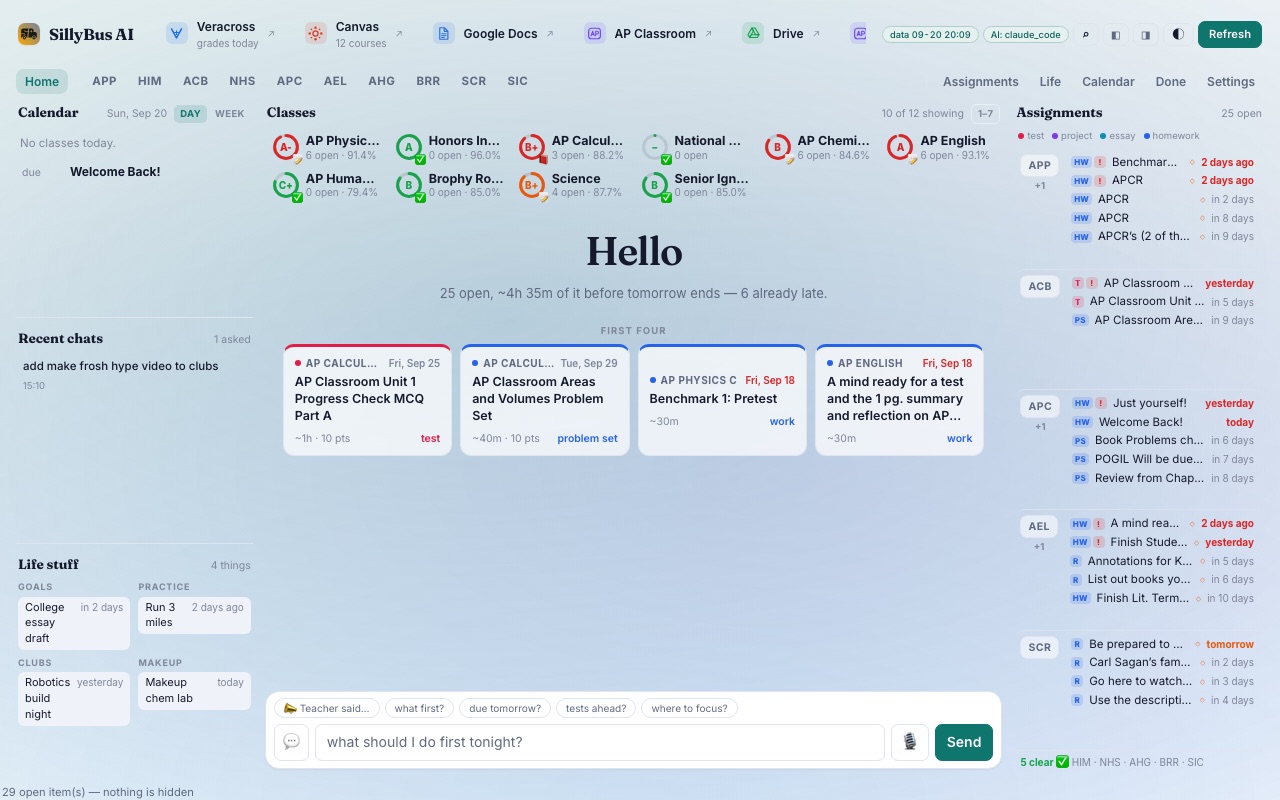
The SillyBus AI board: classes with grade rings, tonight's four assignments, chat
The board
A class page in dark mode: what's open, the grade breakdown, the textbook
One class, dark
Every assignment listed by class, in the warm theme
Everything open
The calendar view with a blue accent
Your week
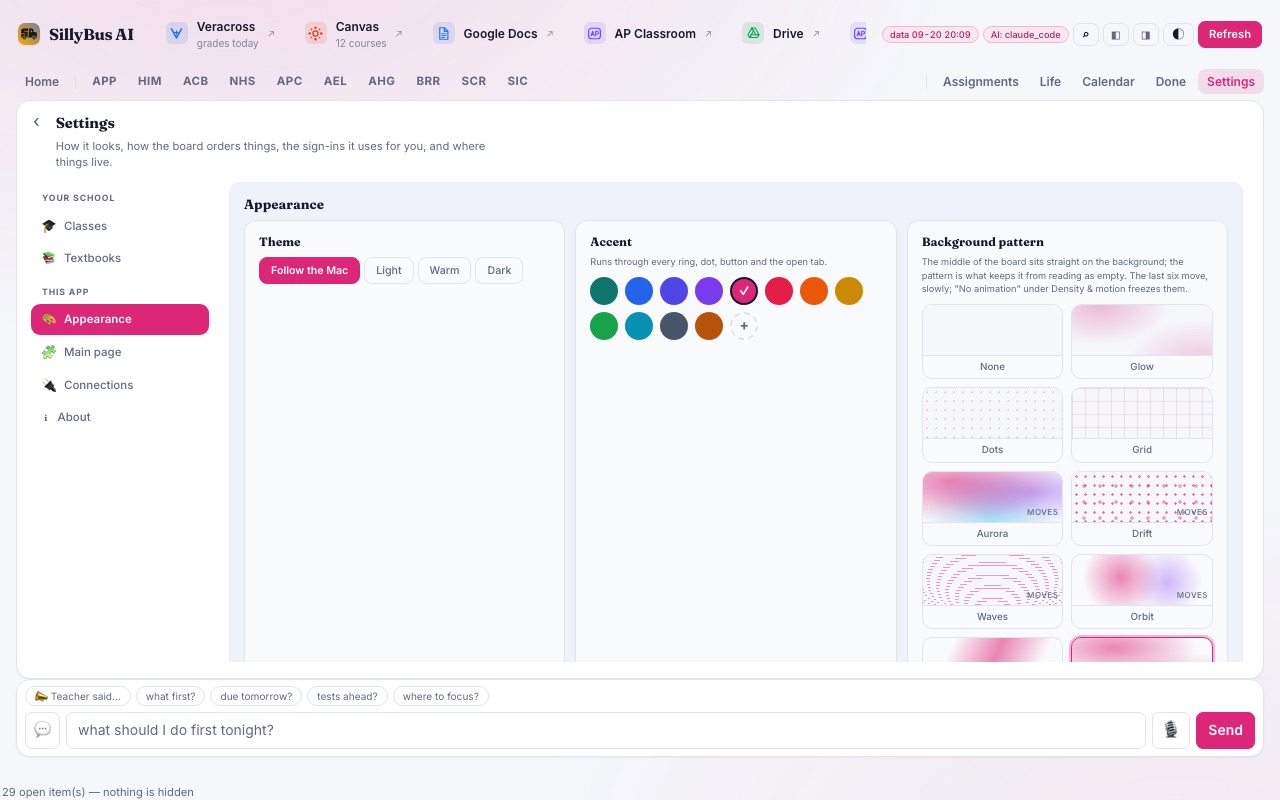
The Appearance settings: theme, accent colour and ten background patterns
Settings

Make it yours.

Every setting below is a real one. Try them — the board on the right is live.

Plus: which sections show, short codes per class, classes hidden from the board, custom order, where it opens, whether the week starts Monday — and twelve more.

SillyBus AI Veracross Canvas Docs Refresh
HomeAPPACBAPCAEL
A-
AP Physics C6 open · 91.4%
B+
AP Calculus BC3 open · 88.2%
B
AP Chemistry6 open · 84.6%
A
AP English6 open · 93.1%
Hello
25 open, ~4h 35m of it before tomorrow ends.
AP CALCUnit 1 Progress Check~1h · test
AP PHYSBenchmark 1: Pretest~30m · work
what should I do first tonight?Send
Assignments
APPBenchmark 12 days ago
ACBAreas and VolumesTue
APCBook Problemsin 6 days
AELAnnotationsin 5 days
Being built right now

And a way to actually start.

Self-discipline, built in. Three modes — you pick.

youtube.comnothing happens

Off

Not installed, not watching. No site permission is even held.

youtube.com
2 things due tomorrowLab report · Problem setOpen the board

Reminder

A card slides in with what's actually due. Wave it away and the page is never touched.

youtube.com
Lab report is due at 8:00 AM
PIN to get past

Block

A gate that names the work, with a PIN bypass for one minute or an hour.

Three stops.

  1. Get itDownload the Mac app, or add it from the Chrome Web Store.
  2. Stay signed inCanvas, Veracross, AP Classroom — it reads with the logins you already have. It never asks for your password.
  3. Hit refreshEvery class, ranked by what's due. Ask the AI what to do first if you want.

Free now. Cheap later.

Everything is free right now. Once accounts arrive, you'll pick a plan — and Free stays free:

Free
$0
  • 50 refreshes a month
  • Every source, one board
  • Chat answers from your board
Unlimited
$10/mo
  • Unlimited refreshes
  • Unlimited Accelerates
  • AI included, no key needed

A refresh re-reads every source and rebuilds your board. Until accounts exist, the AI runs on your own Anthropic key — or leave it off and just use the board.

What's new

    Five tabs is not a system.

    Free, two minutes, and your homework stops hiding. If your school runs Canvas, it works. Questions? info@sillybusai.com